


Talkie: Creative AI Community
4.669.72K Reviews
App Specs
- Version
- 2.59.004
- Updated On
- License
- Free
- Downloads
- 50,000,000+
- Developer
- SUBSUP
- Categories
- Entertainment
- Platform
- Android, iOS
Screenshots

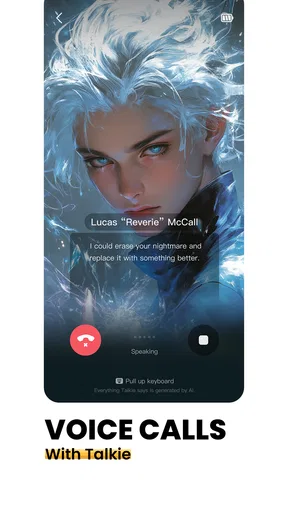
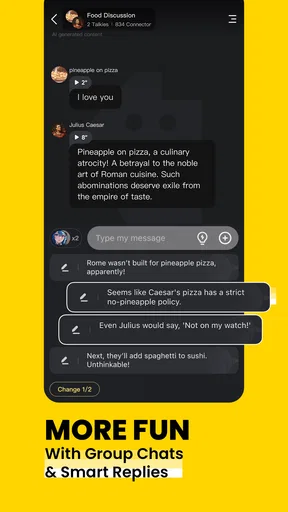
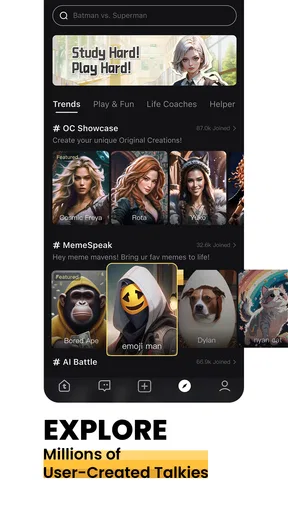
 Analysis by AppCompare
If you're looking for a fun and interactive way to engage with an AI community, let me introduce you to Talkie: Creative AI Community. I've been tinkering around with this app for a while now, and I've got some thoughts to share. What matters most is knowing what kind of company it keeps: Talkie works best as a playful place to explore conversations and creative prompts, not as a replacement for a dependable reference tool or a focused writing workspace.
What it feels like to use
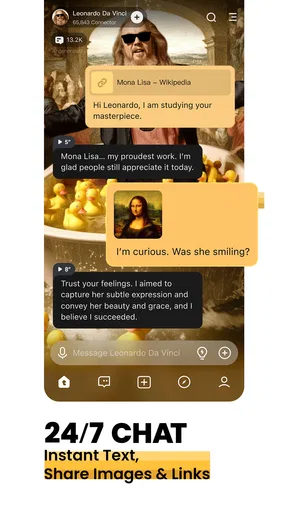
The appeal is the chance to chat with AI personas rather than simply type questions into a general-purpose assistant. That changes the mood of the interaction. I find it easier to use a character conversation for low-pressure brainstorming, improvising a scene, or exploring a fictional point of view than I would with a blank chat window. The persona gives you a starting frame, though it can also steer a conversation in ways that are entertaining rather than especially useful.
That distinction is worth keeping in mind before you install it. When I want a quick factual answer, a conventional search engine or an assistant designed for direct question-and-answer work is usually the better fit. When I want to play with an idea, talk through a story premise, or see where an unusual exchange goes, a character-led app has a different kind of value. Talkie is aimed much more at the second mood.
Cost, access, and what value means here
Talkie is free to download, so you can try its basic appeal without paying upfront. It also offers in-app purchases, with listed items ranging from $0.49 to $199.99 each. That is a wide span, so I would treat the free entry point and the paid options as separate decisions: first work out whether you enjoy the app’s style, then decide whether any purchase seems worthwhile to you.
I would not assume that a purchase is necessary just because the app offers one. The useful question is whether you are spending enough time with the experience to care about the particular benefit shown in the app before buying. Check the item details and the checkout screen carefully, especially if you are trying to control spending. The range alone does not tell you what an individual item does, so I would avoid paying on the strength of a vague expectation.
For a casual user, free access can be enough to judge whether character conversations suit them. For someone who returns often and finds a specific paid option valuable, a purchase may make sense, but that is a personal call rather than a reason to buy in advance. In my view, the strongest value is the opportunity to experiment with conversational creativity; it is not a promise that every chat will be profound or every idea ready to use.
What is Talkie All About?
So, what exactly is Talkie: Creative AI Community? In the simplest terms, it’s a vibrant platform where AI meets creativity. Imagine a space where you can chat with AI personas, share creative ideas, and even co-create projects. It's like having a bunch of AI buddies ready to brainstorm and come up with innovative ideas at any moment.
Worth Reading Before You Choose

EA SPORTS FC Mobile 26 Is a Bigger Football Game, but It Takes Time

Flipboard Shows What News Apps Must Do Beyond the Feed

Switching to Android Auto Means Rethinking Your Driving Routine

Google Calendar Makes a Crowded Week Easier to Manage

Ludo King Makes the Most of the Minutes Between Plans

Baby Panda World Brings Quick Play to Modern Phones, but Its Game Library Feels Busy
Getting Started
Jumping into the app is a breeze. Once you download it, you’re greeted with a friendly interface. It's intuitive, so you won’t feel lost even if you're not super tech-savvy. The chat feature is where the magic happens, and trust me, you’ll find yourself diving into conversations with AI that are surprisingly engaging.
For the best first session, I would arrive with a small, concrete prompt rather than expecting the app to guess what I want. For example, ask for three possible twists for a scene, then choose one and explain what tone you want. That gives the conversation a useful direction while leaving room for the character’s personality to add a surprise. If the exchange wanders, a short reset—stating the goal and the details that matter—can be more productive than continuing to correct every reply.
Features That Stand Out
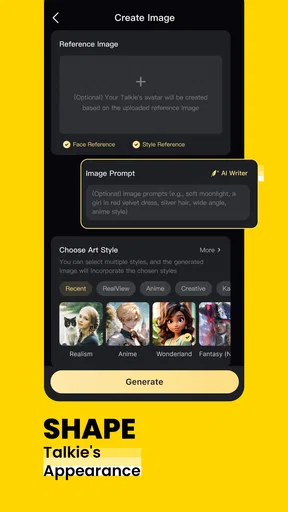
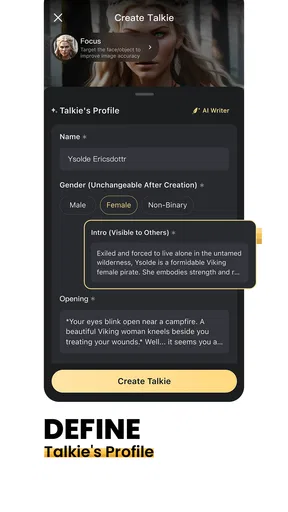
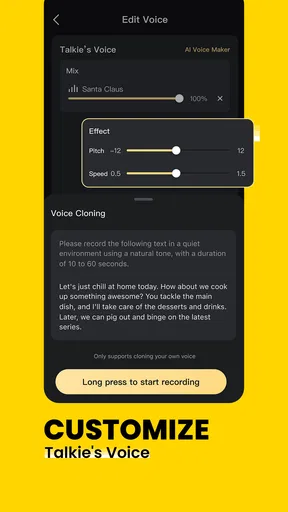
The standout feature for me is the ability to customize AI personalities. You can tweak their traits, making each interaction feel unique. Whether you want an AI that's quirky, serious, or downright hilarious, Talkie has got you covered. It's like creating your ideal conversation partner.
Customization is most helpful when you think of it as setting a conversational role, not guaranteeing a consistent human-like character. I would define a few traits that serve a purpose—such as supportive, skeptical, or dramatic—rather than piling on unrelated qualities. A clear role gives you a better chance of getting responses that fit the activity, whether you are rehearsing dialogue or testing how a fictional character might react to a decision.
Apart from chatting, there's a creative hub where you can collaborate on projects. Whether it’s writing, art, or music, the possibilities are endless. The community aspect really shines here as you can share your creations and get feedback from fellow users.
Making the creative side practical
For a realistic everyday use, imagine having ten minutes between errands and wanting to make progress on a story idea. I would use a character chat to generate a few different reactions to a problem in the scene, save the strongest idea in my own notes, and return later to develop it. That is a better fit than asking the app to produce a finished piece in one go: you stay in charge of the choices, and the conversation supplies material to work with.
The same approach can help with a creative block. Ask for contrasting possibilities rather than a single “best” answer: a calm response, an awkward one, and an unexpectedly funny one. Comparing alternatives helps reveal what tone you actually want. It also makes the AI’s limitations easier to spot, since a fluent suggestion is not automatically original, accurate, or suitable for your project.
Community sharing adds another dimension, but it also changes the experience from private play to public participation. If you post something, consider whether you are comfortable with other people seeing and responding to it. I would share a small excerpt or an early concept first, rather than putting personal writing or sensitive details into a public-facing creative space. That is a sensible habit for any social app where users can exchange work.
Where it fits among other apps
Compared with a standard chatbot, Talkie puts more emphasis on persona and imaginative interaction. A general assistant is often the more efficient choice for summarizing information, organizing a practical task, or getting a direct answer. A writing app gives you more control over a document and its structure. Talkie’s appeal is the less formal middle ground: a conversational partner that can help you explore possibilities without making every session feel like work.
It is also different from a conventional social network. The draw is not simply browsing posts or messaging friends; the AI character is central to the exchange, while community activity can add human feedback around creative work. If what you want is sustained collaboration with people who know your project, a dedicated writing group or a direct conversation with a friend may be more useful. Talkie is better for quick inspiration and experimentation than for accountable, long-term teamwork.
Why You'll Love It
Now, let’s talk about why this app could be your new favorite pastime. First off, it’s a fantastic way to spark creativity. Feeling stuck with writer’s block or need some inspiration? Fire up a conversation with an AI, and you'll be surprised at the ideas that flow.
There is a catch: the quality of a brainstorming session depends on how clearly you steer it, and some suggestions may feel repetitive or miss the point. I would treat replies as prompts to react to, not finished answers to accept without thought. For factual work, check important claims elsewhere; for personal decisions, do not let a convincing conversational tone stand in for sound advice from a qualified person.
Plus, Talkie offers a unique social element. It's not just about chatting with AI; it’s about connecting with like-minded people who are just as passionate about creativity. The community is welcoming, and it's always buzzing with new ideas.
That social side will appeal most if you enjoy seeing how other people approach creative play. If you prefer a quiet, private tool with no community layer, the public-facing element may be a distraction rather than a benefit. Likewise, anyone looking for a strictly professional work environment may be better served by software built around editing, project management, or collaboration controls instead of character conversation.
Who is likely to get the most from it?
I would recommend trying Talkie if you like roleplay, character-driven conversation, or lightweight idea generation and you are happy to guide the exchange yourself. It can suit a student looking for a playful way to explore a fictional scenario, a hobby writer testing dialogue, or someone who simply enjoys imaginative conversation during a break. Its entertainment focus is clear, and its Teen content rating is a useful reminder that it is intended for a teen audience and older, rather than very young children.
Talkie may be a poor match if you need reliable research, polished final copy, or a predictable professional assistant. It is also worth skipping if you dislike AI characters, have no interest in sharing creative work, or would rather avoid optional purchases altogether. A free download lowers the barrier to trying it, but it does not mean you have to spend money or keep using it if the conversations do not click.
SUBSUP is the developer behind the app, which has an average rating of 4.6 from around 693,000 ratings and more than 50 million installs. Those figures suggest broad interest, but they cannot tell you whether its style will suit you personally. It is free, rated Teen, and the current version is 2.43.002; it requires Android 8.0 or later. I would check that your device meets the requirement before trying to install it.
Wrapping It Up
In a nutshell, Talkie: Creative AI Community is more than just an app; it's a creative playground. Whether you're looking to brainstorm, create, or simply have a good chat, this app delivers on all fronts. It's fun, it's engaging, and it's definitely worth checking out. So go ahead, give it a whirl, and see how it transforms your creative process.
My more measured verdict is that it is worth trying if you want entertainment built around AI personalities and creative exploration, especially because you can start without paying. I would keep expectations grounded, use it as a source of ideas rather than authority, and make any purchase only after checking exactly what you are buying. If your priority is dependable answers or a structured workspace, choose a tool designed for that job; if your priority is playful conversation, Talkie has a distinctive lane to explore.
Pros
- Engaging AI-generated conversations.
- User-friendly interface enhances accessibility.
- Diverse topics keep it interesting.
- Customizable chat settings.
- Regular updates with new features.
Cons
- Occasional AI response delays.
- Limited offline functionality.
- Requires stable internet connection.
- Some features locked behind paywall.
- Initial learning curve for new users.
FAQs for Talkie: Creative AI Community
What is Talkie: Creative AI Community?
Talkie: Creative AI Community is a unique platform that blends creativity and artificial intelligence, allowing users to interact with AI-driven characters and scenarios. It offers a space for creative expression, storytelling, and learning through AI interactions. Users can explore various AI personalities and engage in dynamic conversations.
How does the AI functionality work in Talkie?
The AI in Talkie is designed to simulate realistic conversations by using advanced natural language processing. It adapts to user inputs and provides responses based on the context of the conversation. This interactive AI experience encourages users to explore different narrative paths and engage with characters in a lifelike manner.
Is Talkie: Creative AI Community free to use?
Talkie offers a basic free version, allowing users to engage with AI and explore its core features. However, premium content and advanced functionalities may be available through in-app purchases or subscriptions, providing an enhanced experience with additional characters and scenarios.
What are some key features of Talkie?
Key features of Talkie include interactive AI characters, customizable scenarios, and a creative platform for storytelling. Users can explore various themes, engage in role-playing, and even create their own stories. The app also supports community engagement, allowing users to share their experiences and creations.
Is Talkie suitable for all age groups?
Talkie is designed to be family-friendly, with content suitable for a wide range of age groups. However, parental guidance is recommended for younger users to ensure that interactions remain appropriate and educational. The app aims to be both entertaining and informative, promoting creativity across different demographics.


